Two Linked BibleView Windows
Class Objective: In this class, we show you how to open two BibleView Windows, and link them for viewing verses in one from the other window.
Continue reading Two Linked BibleView Windows
Class Objective: In this class, we show you how to open two BibleView Windows, and link them for viewing verses in one from the other window.
Continue reading Two Linked BibleView Windows
When you make a module set, the left hand window has a search function that will search all filenames and filter all files to only those fitting the search criteria. You can use this to make specialize Module Layout Sets in an easy way.
Step 1: In Windows File Explorer, examine your files. Here rename the files of a specific category, say files dealing with the “Atonement”, and add a special unique code to identify the file as belonging to that category.
Let’s take the atonement category. On my website, you search for that category. Simply find a single file that has the topic or category you are looking for and examines the different parts of the post.
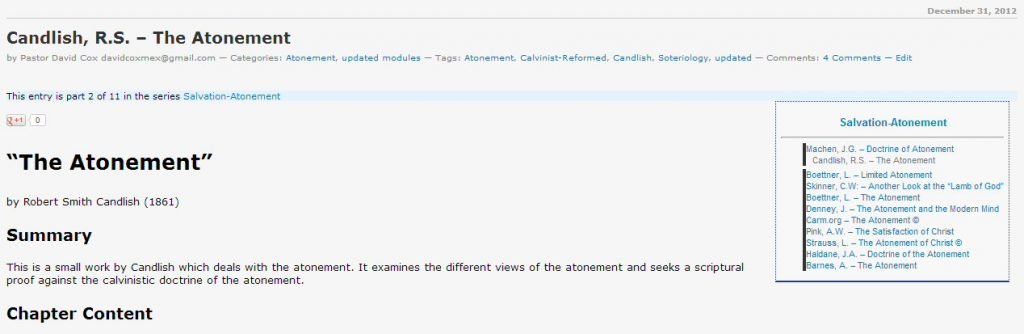
Note on this image the various parts in blue. First of all, there are “Categories” under the Title. You can click on that category link and see all in that category. Second, there is a series tag which is seen in “This entry is part 2 of 11 in the series Salvation-Atonement“. This is the same as the list in the box “Salvation-Atonement”. You can Control+Click on each of the modules in the box and a separate browser tab will open with that post in it. You can also just type in the topic in the search box at the top right of the sidebar.
Criteria: I tag these by hand, so I can miss some, or miscategorize a book or two sometimes.
Method Two: Category tagged: http://www.twmodules.com/category/atonement/
Note that this is a valid category from the website, and by just adding “/category/” you can access the website and these modules.
Criteria: I also tag these by hand.
Method Three: Searching the website. In the search box in the top right-hand side at the top of the sidebar, there is a search box, and you can search on the files on the basis of your word.
Criteria: The only way a module will end up in a search is if the search word is actually in the post somewhere.
Note: As with all of these methods, there is a margin for error. Sometimes the search word appears in the post, but the module is not about that subject at all.
Once you have downloaded the modules that you want for a category module set (or select them from your list of modules), you can easily prep them for the Module Layout Set. Here, just add to the filename the identifier you decided on. Here I added (atone) as my identifier, and put it right after the filename (see below). Surrounding the identifier with parentheses “()” makes it harder for some other module to mistakenly be included.
simpson-divine-healing-in-atonement(atone).gbk.twm
barnes-atonement(atone).gbk.twm
winslow-atonement(atone).gbk.twm
owen-death-of-death-in-the-death-of-christ(atone).gbk.twm
best-the-saviours-definite-redemption(atone).gbk.twm
candlish-atonement(atone).gbk.twm
pink-the-satisfaction-of-christ(atone).gbk.twm
haldane-doctrine-of-atonement(atone).gbk.twm
skinner-another-look-at-the-lamb-of-god(atone).gbk.twm
denney-the-death-of-christ(atone).gbk.twm
denney-the-atonement-modern-mind(atone).gbk.twm
boettner-limited-atonement(atone).gbk.twm
dabney-christ-our-penal-substitute(atone).gbk.twm
boettner-atonement(atone).gbk.twm
pink-doctrine-of-reconciliation(atone).gbk.twm
bronson-the-extent-of-the-atonement(atone).gbk.twm
machen-doctrine-of-atonement(atone).gbk.twm
candlishr-the-atonement(atone).gbk.twm
Within theWord, make a module layout set.
Then search in the left panel for “(atone)”. This will quickly make a layout for atonement. As an alternative, you can also make a doctrinal layout set, and have these in a folder within that set.
Specialized theWord Study Area. Today we live in a day when most people have huge hard disks. Space is a luxury most people have. In this post, I just want to share with you something that I have been doing for years. It works really well most of the time. What I am talking about is physically making a tw installation on your computer for just a specialized study. What we are going to do is to set up an area with just certain modules.
What I am suggesting here can also be done with Module Layout Sets. So this is not the only way to set up something similar.
theWord Book Summary, theWord chapter summary
In this class, we will learn about the book and chapter summaries. Note that theWord has a lot of features that other programs don’t even consider, much less have. Continue reading theWord Book Summary, theWord chapter summary
Here I am going to simply begin by referring you to Dr. Dave T’s helpful blog post about how to do this.
Also, download from my site these Greek modules in zip packs.
I will be open about this, I don’t have a linux machine nor a Mac. But from the feedback from the many people who have installed theWord on these platforms it is fully possible to install and use the program on these platforms.
NOTE: Being a Mac or Linux user, you should be aware of the possibility of using Windows programs on your platform via a WINE (Windows Interpretation and Emulator). This WINE program is also free. These programs are platform specific, and they allow you to install theWord program on your machine. It is possible. Continue reading Installing theWord on Mac-Linux-Ubuntu

