
Class Objective: This class will briefly show you how to select a Module Set.
Requirements: If you don’t have any module sets made, you will first need to learn how to make them. See the sidebar “Module Sets” or the How to Make Module Sets post.
Once you know how to make module sets, and you make some, you will need to select them to use them. This is very easy.
First of all, module sets only work with the Bookview window, so open a Bookview window (F12). Now look for the Green icon in the upper left hand corner of this window. Click on it.
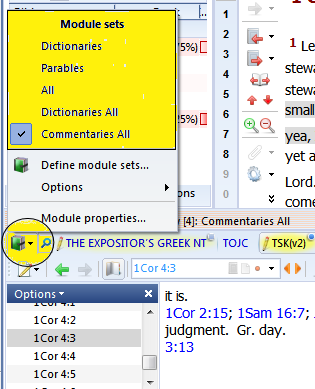
To select one of your module sets, click on the green books icon.
Here you can see I have several module sets (upper yellow area), with Commentaries All currently selected.
Note that theWord comes with no module sets pre-made. These module sets totally depend upon what modules you have installed so there is no way for the program to come out of the box with these premade.
You need to make your own before any will show up on this pop up menu.
 [wpfilebase tag=file id=46 /]

