How do I remove so many Bible Versions from the Bible Version Selector Bar without uninstalling them?

!–more–>
There are two solutions to this problem:
1) Permanently remove the Bible version from TheWord.
You can do this by closing down completely (exiting) the program. But before you do, make sure you know where the particular Bible version is located by checking its install folders.
Next shut down TheWord and go to that folder and move the Bibles out of theWord folders to another storage place somewhere else on your computer. This is a simple Windows Explorer activity to move a file.
<
2) Temporarily hide the unwanted Bible version(s) from TheWord.
To temporarily hide unwanted Bible version(s) in the Bible Version Selector Bar, go to the Main Menu of TheWord, then Preferences, then click on the “Bible Texts” tab at the top. You should see this screen (different Bible versions of course).
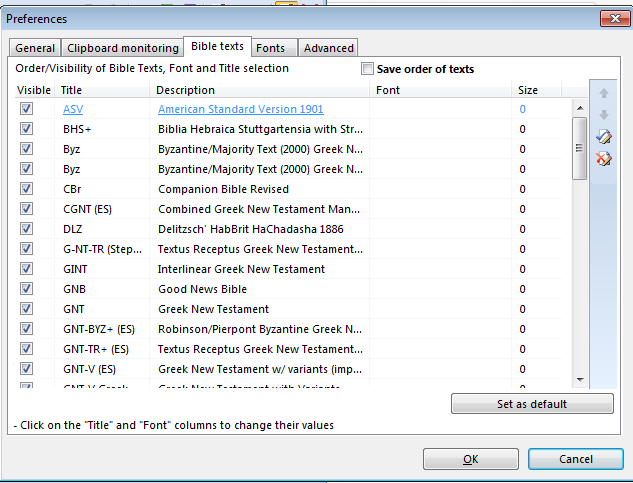
Notice the checkboxes on the left-hand side of this screen (before the Bible version abbreviation). Simply uncheck the ones you do not want to see in the bar. If you later want to see them (you have to remember that you have it installed) then come back here and check it again.
More Articles from this Category