Where is Strong’s Numbers in KJV? explains how to reveal the strongs number associated with each word in the KJV.
Where is Strong’s Numbers in KJV?
By David Cox
Class Objective: Resolve the problem of no Strong’s numbers showing in the King James Bible. NOTE: In a normal installation of theWord from the official website, you should have both the Strong’s KJV and the Strong’s dictionary as part of the normal installation.
Faulty Module ID. This is a problem that comes about sometimes when TW detects two modules with the same “supposedly unique” TW Identifier. This happens when module creators don’t check with Stergiou Costas, theWord creator, for a batch of Module IDs to use.
Class Objective: This class explains the TheWord options for using the program when you have eyesight problems.
Many legally blind people who can still see some are using computers as they can to study the Bible. TheWord has a few options that make using it easier for these people. Continue reading Visually Impaired Users
The Simple Bible Reader program is a program which is made for converting modules from one Bible format to another. I did not create nor do I maintain this program, it is developed by other people.
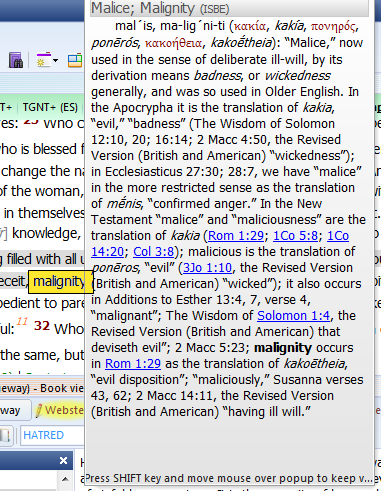
Dictionary Lookup Popup. When you setup this feature of the word, you can quickly lookup the definition of a Bible word in various commentaries completely AUTOMATICALLY with just passing the mouse over the word in a Bible.
Note that TheWord will put as many or as few Bible Dictionaries (optionally any module will work) into the mix to search, and when the popup shows, YOU HOLD DOWN SHIFT and click in the popup window, and you can then scroll down the window to see the different dictionary definitions.
This Bible Dictionary feature is extremely powerful and useful, and you can use it to quickly (almost instantaneously) see many definitions of a word. See below at the bottom of this post for more uses of this feature.
(Note that in the illustrations below, I am highlighting the word I am mousing over in the image so you will see where my mouse is, but in TheWord, the word stays the same color.)
There are times when you want a second “copy” of the program on your hard disk, or you want to install the program onto a USB flash drive, and this post will examine this function, and tell you how to use it. Continue reading How to install TW in Compact Mode (USB mode)