
Must-know tricks and procedures of theWord is a class for the beginner in theWord. These tricks or methods or procedures are absolutely necessary for the user to work well in theWord. They should be the first things he learns how to do in theWord program.
Author: David Cox
Commentary Module Creation
Commentary Module Creation
By David Cox
OBJECTIVE: In this class we will go through the simple steps for creating a new commentary module. For purposes of this class, we will not discuss copyrights which is also a very important topic.
Installing a TWZIP module
Costas has come up with another way to install TW modules.
This is very easy. Now instead of making new TW modules into an installer exe, we can just zip it up as a compressed file with the extension “*.twzip”.
How to install a TWZip file into theWord?
First of all, you download this file from the Internet. Do not worry about whether they are a bunch of modules in one TWZIP compressed file, or a bunch of single module TWZIPs. Download everything.
How do I show the BibleView Window Options Icons (at left)
BibleView Window Options Icons
Topic: How do I show the BibleView Window Options Icons (at left)
By David Cox
BibleView Window Options Icons. When using theWord, at times you accidentally press a wrong combination of keys, and you are left with something you don’t want. I have been using theWord working in a Bible, and all of sudden the entire left-hand icons disappear on me, well actually, I pressed the wrong keys and they disappeared on me.
For most things with theWord you can go to the main menu at the top, and you can search there for turning something on or off. But in this particular case, you will need to know how to do this while you have the Bibleview window in particular active. Then it is very easy.
Tip: So if you do not see the left-hand menu Icons in your BibleView. If this is the case, then press Ctrl+T to toggle it on/off or hide/show.
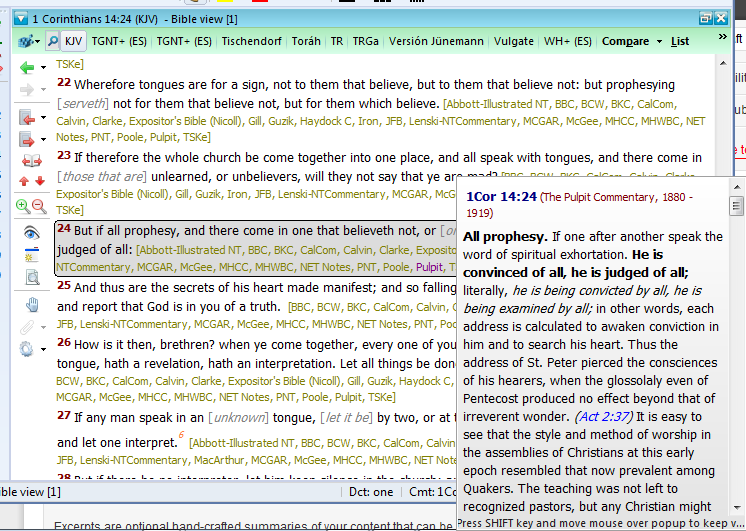
Note that YOU MUST FIRST CLICK IN THE BIBLEVIEW WINDOW TO MAKE IT ACTIVE or this won’t work.
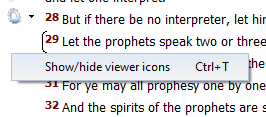
See the image below (icons on left ) for an example of a BibleView Window with this icon column.
Help Tutorial by Paul Chapman
Paul gives us an overview of how to use the left-hand icons in the Bible View window. He explains several of the icons and what each one does.
More Articles from this Category
- YouTube Views Verse Lookup
- Where is Strong’s Numbers in KJV?
- Using theWord Commentary Links
- Using Inline Commentaries
- Two Linked BibleView Windows
- theWord Installing Bibles

Method: Greek Translation
Class Objective: This page will teach you how to set up theWord to study the Bible using two Greek Bible versions, two non-Greek Bible versions, Strong’s Dictionary, and Robinson’s Morphology Codes.
In this method, I want to show you how I set up my theWord windows to translate or study the original Greek language. Putting aside all the discussion about Bible manuscripts, I just want to look at a passage in the KJV, in a Greek Bible, and in Spanish (I am a missionary in Mexico). As such I am comparing 2 non-Greek versions with two Greek versions.

How to install TW “normally” on a Windows machine
Objective: To go through the steps to “normally” install TheWord in a typical Windows PC.
Continue reading How to install TW “normally” on a Windows machine