theWord Compare Bible Versions

theWord Compare Bible Versions

theWord Compare Bible Versions
By David Cox

Class Objective: This page will teach you how to set up theWord to study the Bible using various different Bible versions, seeing them side by side, or one on top of the other.
__________

Introduction

We begin this class with a basic “How to get there”. This option is activated in the BibleView Main Window. Although the Bible Selector Bar will dynamically move the Bible version abbreviations around on this bar, there are two options at the far right that will never be moved around, Compare and Lists. Continue reading theWord Compare Bible Versions


Strongs Number theWord


theWord Bible software comes with the KJV preinstalled. In this version of the Bible, it also has Strongs Numbers in it. They are usually hidden, but by just clicking inside the Bible window and pressing “s” with nothing else, no control, no alt, it will toggle the Strong’s numbers to visible or invisible IF THAT BIBLE HAS STRONGS NUMBERS IN IT


More Articles from this Category


theWord Basic Bible Window: Navigation

theWord Basic Bible Window: Navigation

Objective

To understand and learn how to do some basic navigation in the TW Bible Window.

Note that you can rearrange the windows within the TW interface, so a sub-Window’s position is not really going to tell you what kind of Window it is. What will tell you that it is a Bible window is the phrase “Bible View” after the title on the title bar. Continue reading theWord Basic Bible Window: Navigation


YouTube Views Verse Lookup


This video tutorial is by Paul Chapman. This particular video is an introduction to the Views in BibleWord and the verse lookup function. He goes through how to open different windows.

More Articles from this Category


Where is Strong’s Numbers in KJV?

Where is Strong’s Numbers in KJV? explains how to reveal the strongs number associated with each word in the KJV.

Where is Strong’s Numbers in KJV?
By David Cox

Class Objective: Resolve the problem of no Strong’s numbers showing in the King James Bible. NOTE: In a normal installation of theWord from the official website, you should have both the Strong’s KJV and the Strong’s dictionary as part of the normal installation.

Continue reading Where is Strong’s Numbers in KJV?


Bible-Dictionary Lookup Popup


Bible Dictionaries

Description of Feature

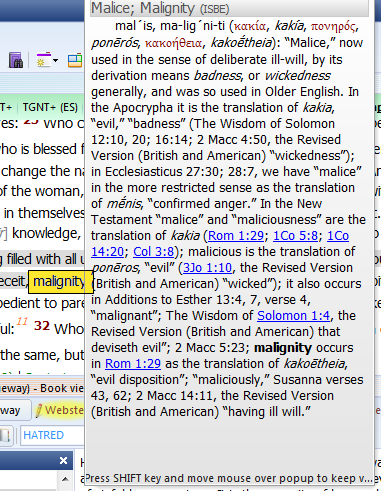
Dictionary Lookup Popup. When you setup this feature of the word, you can quickly lookup the definition of a Bible word in various commentaries completely AUTOMATICALLY with just passing the mouse over the word in a Bible.

Note that TheWord will put as many or as few Bible Dictionaries (optionally any module will work) into the mix to search, and when the popup shows, YOU HOLD DOWN SHIFT and click in the popup window, and you can then scroll down the window to see the different dictionary definitions.

This Bible Dictionary feature is extremely powerful and useful, and you can use it to quickly (almost instantaneously) see many definitions of a word. See below at the bottom of this post for more uses of this feature.

(Note that in the illustrations below, I am highlighting the word I am mousing over in the image so you will see where my mouse is, but in TheWord, the word stays the same color.)

dictionary-lookup-sample

Continue reading Bible-Dictionary Lookup Popup