Grace Word Study (expanded v2) – election or blessing?

Grace Word Study

Grace Word Study. A study on the concept of Grace. Calvinism makes great use of “grace” as a key defining concept for their doctrines, but a simple reading of all the Bible’s mention of grace will show that (1) Calvinism’s presumptions about grace are a redefinition never actually found or validated in Scripture. (2) Grace is the blessing of God on a person, and that it is not necessarily salvation, or just salvation, and the emphasis is not on selection (election) but on the spiritual blessing. Moreover (3) grace is conditioned by God (before God decides to give grace) on certain character and actions that please God being and existing sincerely in the individual before grace is given by God to him.


Continue reading Grace Word Study (expanded v2) – election or blessing?



Removing Bible Versions from Version Selector Bar


How do I remove so many Bible Versions from the Bible Version Selector Bar without uninstalling them?

!–more–>


There are two solutions to this problem:

1) Permanently remove the Bible version from TheWord.

You can do this by closing down completely (exiting) the program. But before you do, make sure you know where the particular Bible version is located by checking its install folders.

Next shut down TheWord and go to that folder and move the Bibles out of theWord folders to another storage place somewhere else on your computer. This is a simple Windows Explorer activity to move a file.

<


2) Temporarily hide the unwanted Bible version(s) from TheWord.

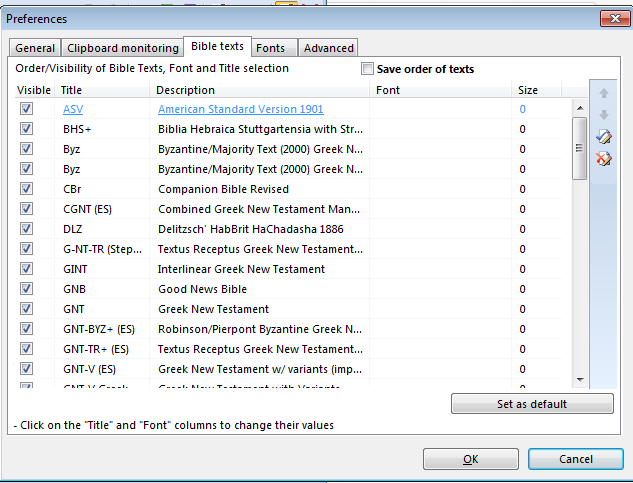
To temporarily hide unwanted Bible version(s) in the Bible Version Selector Bar, go to the Main Menu of TheWord, then Preferences, then click on the “Bible Texts” tab at the top. You should see this screen (different Bible versions of course).

Notice the checkboxes on the left-hand side of this screen (before the Bible version abbreviation). Simply uncheck the ones you do not want to see in the bar. If you later want to see them (you have to remember that you have it installed) then come back here and check it again.

More Articles from this Category


Installing a TWZIP module

Costas has come up with another way to install TW modules.

This is very easy. Now instead of making new TW modules into an installer exe, we can just zip it up as a compressed file with the extension “*.twzip”.

How to install a TWZip file into theWord?

First of all, you download this file from the Internet. Do not worry about whether they are a bunch of modules in one TWZIP compressed file, or a bunch of single module TWZIPs. Download everything.

Continue reading Installing a TWZIP module


How do I show the BibleView Window Options Icons (at left)


BibleView Window Options Icons

Topic: How do I show the BibleView Window Options Icons (at left)
By David Cox

BibleView Window Options Icons. When using theWord, at times you accidentally press a wrong combination of keys, and you are left with something you don’t want. I have been using theWord working in a Bible, and all of sudden the entire left-hand icons disappear on me, well actually, I pressed the wrong keys and they disappeared on me.

For most things with theWord you can go to the main menu at the top, and you can search there for turning something on or off. But in this particular case, you will need to know how to do this while you have the Bibleview window in particular active. Then it is very easy.


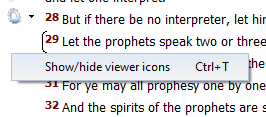
Tip: So if you do not see the left-hand menu Icons in your BibleView. If this is the case, then press Ctrl+T to toggle it on/off or hide/show.

Note that YOU MUST FIRST CLICK IN THE BIBLEVIEW WINDOW TO MAKE IT ACTIVE or this won’t work.

BibleView Window Options Icons


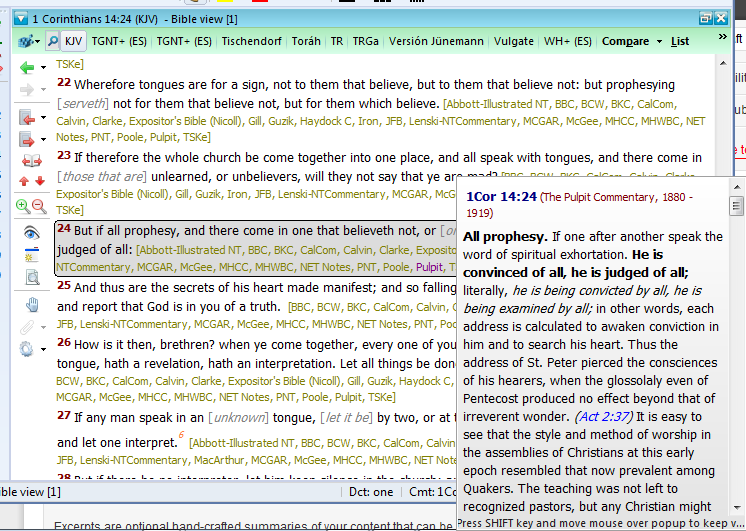
See the image below (icons on left ) for an example of a BibleView Window with this icon column.

BibleView Window Options Icons


Help Tutorial by Paul Chapman

Paul gives us an overview of how to use the left-hand icons in the Bible View window.  He explains several of the icons and what each one does.

More Articles from this Category