theWord module compression
 OBJECTIVE: Explain how to compress a theWord module.
theWord module compression. This tutorial page explains about how theWord Bible program compresses its files. This is an automatic thing, and it helps you to not have to do so. Actually, it is transparent if you activate it.
Why would you want to compress a module?
This is where we should start. Actually there good reasons to compress your modules. First of all, if you are uploading them to the Internet, if you are emailing them, if you are using the modules on a USB Flash memory drive and have limited space, all of these are reasons to compress a module.
What modules can you compress?
You can compress any module except for Bible modules which are just plain ASCII text files.
Exceptions
- You cannot compress a premium “encrypted” module.
- You cannot compress Bible modules (OT, NT, ONT).
- You cannot compress a module if it is locked with a password.
Note that of course you can use a program like pkzip to compress any file. theWord program has this capacity to “INTERNALLY” compress and still use the file compressed which is why compressing it internally (from within theWord) is better than using an external compression program.
How do you compress a module
First of all, you need to select the module from the module select bar. Once you have the module in the bookview window, then right click on its title, or if it is in a folder on that bar, select the file and then right click on the folder.

[wpfilebase tag=file id=45 /]
In the popup dialog box that results, click the second tab at the top, and you should see this image (with your module’s information instead of the one I picked).
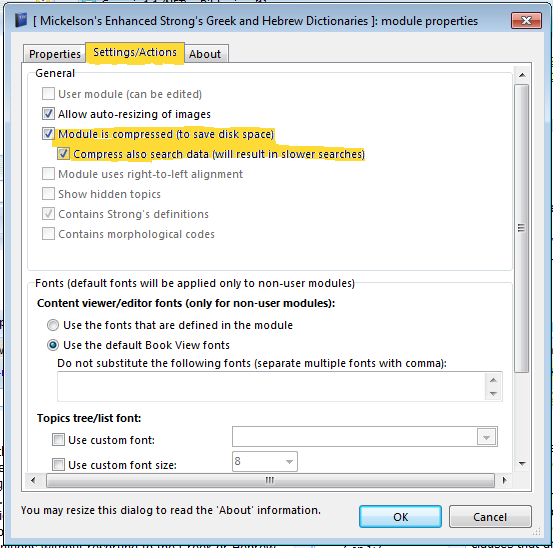
Once you have checked off the corresponding check boxes (above) you click ok and the dialog box will close. Note that this is the preferred way to compress a module to email it. Doing this, you will get as good file compression as using any compression utility out there, and whomever receives the module and immediately use without uncompressing it.