Basically, theWord is an exceptionally full-featured program for making hyperlinks. This feature allows you to link text to other places within the same module, within other modules, and also to Bible verses. (version specific if you desire). You can also make hyperlinks to the Internet. Continue reading Making HyperLinks theWord Bible verse References
Category: Classes

Building your Reference Study Library
Building your Reference Study Library is an article about some general suggestions for the Bible Student and what kind of books he should be accumulating.

Study on Covetousness
Some Biblical Studies on Covetousness
Taken from Biblehub.com see more there. These are Bible Dictionary definitions and a study by me, David Cox.
Module Set: Parables & Types
Module Set: Parables & Types
Class Description: This class post is simply the steps to make a Parables module set for TheWord. Note that you will need to have these modules installed into your system before you can make the module set, but below are links to find them on our The Word Library site. Continue reading Module Set: Parables & Types
Removing Bible Versions from Version Selector Bar
How do I remove so many Bible Versions from the Bible Version Selector Bar without uninstalling them?

!–more–>
There are two solutions to this problem:
1) Permanently remove the Bible version from TheWord.
You can do this by closing down completely (exiting) the program. But before you do, make sure you know where the particular Bible version is located by checking its install folders.
Next shut down TheWord and go to that folder and move the Bibles out of theWord folders to another storage place somewhere else on your computer. This is a simple Windows Explorer activity to move a file.
<
2) Temporarily hide the unwanted Bible version(s) from TheWord.
To temporarily hide unwanted Bible version(s) in the Bible Version Selector Bar, go to the Main Menu of TheWord, then Preferences, then click on the “Bible Texts” tab at the top. You should see this screen (different Bible versions of course).
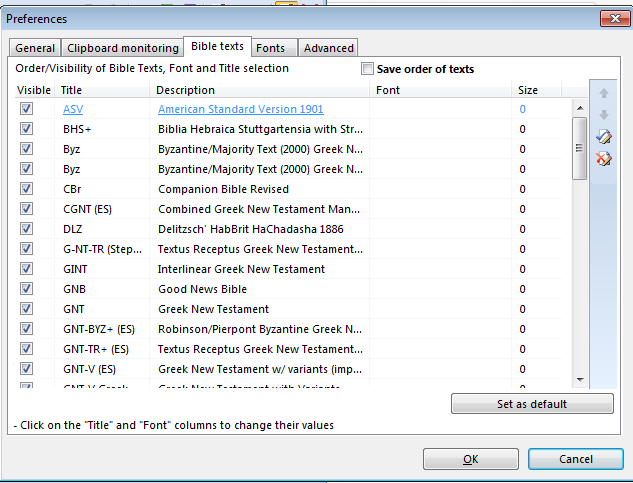
Notice the checkboxes on the left-hand side of this screen (before the Bible version abbreviation). Simply uncheck the ones you do not want to see in the bar. If you later want to see them (you have to remember that you have it installed) then come back here and check it again.
More Articles from this Category
- YouTube Views Verse Lookup
- Where is Strong’s Numbers in KJV?
- Using theWord Commentary Links
- Using Inline Commentaries
- Two Linked BibleView Windows
- theWord Installing Bibles

Must-know tricks and procedures of theWord
Must-know tricks and procedures of theWord is a class for the beginner in theWord. These tricks or methods or procedures are absolutely necessary for the user to work well in theWord. They should be the first things he learns how to do in theWord program.