Class Objective: How do you quickly see the Greek or Hebrew behind a particular verse? There are a lot of ways to look at a passage and see the original language behind it, but this toggle is a short cut for when you want to examine verse references in a book module, and flip back and forth between say an English version and the Greek or Hebrew. Study these two images…
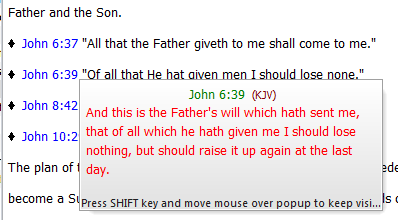
This is the normal TW behavior, when you just move the mouse over a verse reference. (This image is from Murrell’s Systematic Theology module.)
[wpfilebase tag=file id=50 /]
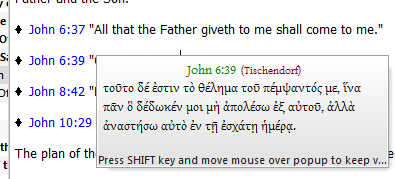
Now you see the same verse but in the active Bible text version.
Setting for viewing two different versions in tooltips.
The way you do this is to use theWords option for seeing tooltips.
First of all, notice that TW has a default Bible version (see Setting the Default Bible Version), and that it has an active Bible version. The difference is that the default Bible version is what you set as your favorite Bible version, and the program will “default” to this in many settings. If you click in the Bible view window and then change to another Bible version, then your “Active Bible Version” is now different than the default version.
Setting the options to work differently
Okay, now we are ready to set an option to see how you want TW to handle the Bible reference tooltip popup. In File-> Preferences click on the Advanced Tab. You will note the following image…
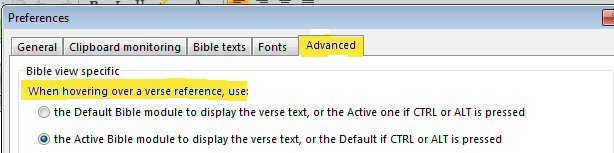
This image shows you where you have the verse pop-up showing the Default Bible or the Active Module. TW allows you to make an “on the fly” choice by using mouseover Ctrl (or Alt) or just mouseover. The way we want to set this up is:
(1) set the default Bible as your English text, and (2) then select a Greek-Hebrew text as your active Bible (what is showing in the Bible View window). Now when you see a Bible verse reference in a module, mouse over it and whether you press Ctrl or Alt as you mouseover it, you will quickly see the two different texts.
Note that this option in the Preferences has the non-Control or Alt for one (Default or Active Bible View) and the other is with these control or alt keys. Set it up either way you like.
