BibleView Window Options Icons
Topic: How do I show the BibleView Window Options Icons (at left)
By David Cox
BibleView Window Options Icons. When using theWord, at times you accidentally press a wrong combination of keys, and you are left with something you don’t want. I have been using theWord working in a Bible, and all of sudden the entire left-hand icons disappear on me, well actually, I pressed the wrong keys and they disappeared on me.
For most things with theWord you can go to the main menu at the top, and you can search there for turning something on or off. But in this particular case, you will need to know how to do this while you have the Bibleview window in particular active. Then it is very easy.

Buy me Burrito! Burritos are delicious. Meat, beans, sour cream, veggies, wrapped in a tortilla. We all enjoy burritos! But you know that you cannot have what is good without somebody paying for it. If you have enjoyed things on my website, please consider helping me maintain the expenses of this site. Consider at least a one time donation to this ministry of $10 or $20 dollars? Very infrequently (one person every 3-6 months) will somebody donate something. Usually that is all I receive from 34 websites! Yet, from my download statistics, I have about 96 gigabytes total being downloaded monthly from all of these websites. Be a blessing to me and donate any amount. It would be really great if you could gift me and my wife (who splits a burrito?) this money so that we could enjoy eating out at least once in a while. (I pay the expenses for these sites out of our living expenses.) God will richly bless you and repay you for your generosity. 1 Timothy 5:18 For the scripture saith, Thou shalt not muzzle the ox that treadeth out the corn. And, The labourer is worthy of his reward. If you received some value from my websites, consider at least a small donation. A big donation would really be nice, too, though.
Donate to David Cox Ministries.
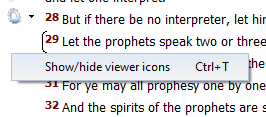
Tip: So if you do not see the left-hand menu Icons in your BibleView. If this is the case, then press Ctrl+T to toggle it on/off or hide/show.
Note that YOU MUST FIRST CLICK IN THE BIBLEVIEW WINDOW TO MAKE IT ACTIVE or this won’t work.
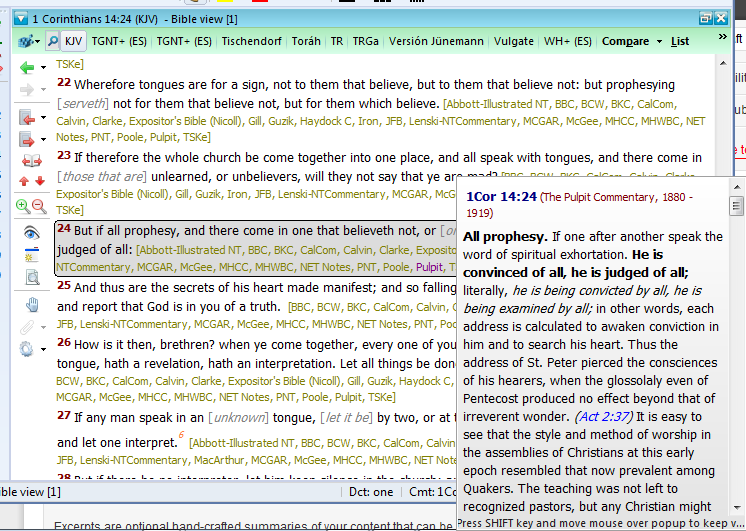
See the image below (icons on left ) for an example of a BibleView Window with this icon column.
Help Tutorial by Paul Chapman
Paul gives us an overview of how to use the left-hand icons in the Bible View window. He explains several of the icons and what each one does.
More Articles from this Category
- YouTube Views Verse Lookup
- Where is Strong’s Numbers in KJV?
- Using theWord Commentary Links
- Using Inline Commentaries
- Two Linked BibleView Windows
- theWord Installing Bibles